Selected cases
Integrating Accessibility into a low-code builder
Empowering Users to Create WCAG-Compliant Interfaces Seamlessly
YEAR
2022
COMPANY
Rock Content
KEYWORDS
a11y, AODA, ADA, SaaS, low-code, B2B2C, Churn prevention

Summary
In a hurry?
I know you would love to grab a cup of coffee before the next meeting, so here's a snapshot for you 💚
Research
Research involved a deep technical analysis of WCAG 2.1 AA guidelines, collaborating with engineering to map criteria, identify refactoring, and evaluate feasibility. This resulted in a prioritized list of necessary updates for Ion's components and legacy code.
Process
The design process aimed for seamless integration with minimal user-facing changes. Key features included dropdowns for tags/roles, ARIA labels, behavior warnings, and autocomplete. Prototyping was lean, focusing on new input fields. Testing involved compliance tools, user demos, and monitoring support tickets given rapid deployment.
Results
The project successfully empowered Ion users to build WCAG 2.1 AAA compliant interfaces, meeting critical enterprise demands and mitigating legal risks, especially in regions with strong accessibility laws. This also enhanced Ion's competitive positioning and improved performance. Strategic metrics were not collected due to urgency, an area for future improvement.
And now, the long version:
Project context
There's no excuse to delay accessibility features
This case study details the flash project to integrate comprehensive accessibility features into Ion, a low-code website builder. The primary goal was to empower Ion users—even those with minimal coding or accessibility knowledge—to create interactive web interfaces compliant with Web Content Accessibility Guidelines (WCAG). This directly addresses legal requirements like the Americans with Disabilities Act (ADA) and Ontario's own Accessibility for Ontarians with Disabilities Act (AODA), ensuring digital products are usable by people with disabilities, including visual or mobility impairments.
Challenges
This is not a drill, people
The project faced multifaceted challenges:
Business Challenge: Growing customer demand for WCAG/ADA/AODA compliance, driven by increasing legal requirements (like the AODA deadlines in Ontario) and the reputational risk associated with inaccessible websites. Non-compliance was becoming a competitive disadvantage and a source of potential customer churn.
User Challenge: Ion's users needed intuitive tools to build accessible interfaces easily, without requiring deep expertise in complex accessibility guidelines or coding, aligning with Ion's core low-code value proposition.
Product/Design Challenge: Integrating robust accessibility features into a mature product with significant legacy code and pre-existing usability concerns reported by users. The key UX challenge was to add necessary functionality without further complicating the user experience or overwhelming users, honouring the platform's promise of simplicity.
If we do not offer accessibiity features 'till the next quarter, I'll be losing over half of our customers
Customer Success Manager
My role & responsibilities
What my brain did even though it was on fire
As the Lead Product Designer, I was responsible for analyzing WCAG requirements, defining user workflows for accessibility features, designing accessible UI components and patterns, creating interactive prototypes, collaborating on testing strategies, and working closely with engineering for implementation.
Process & solution
How & Why
Project Goals
Enable Ion users to create web interfaces compliant with WCAG 2.1 Level AA directly within the platform.
Integrate accessibility features seamlessly into the existing builder workflow, minimizing extra effort or specialized knowledge needed from the user.
Address customer demands for compliance, reducing business risk for Ion's clients and enhancing Ion's market competitiveness, particularly in jurisdictions with strong accessibility laws like Ontario.
Implement the required technical changes efficiently despite constraints posed by legacy code.
Design Process
Our approach combined technical discovery with a user-centered design process, adapted for compliance-driven requirements:
Technical Discovery & Requirements Definition: Deep dive into WCAG 2.1 AA guidelines and detailed analysis of legacy code impact.
Design & Prototyping: Designing accessible components, intuitive user flows for accessibility settings, and creating interactive prototypes.
Validation & Iteration: Testing the usability of new features with users and verifying technical compliance with accessibility standards.
Handoff & Implementation: Providing detailed specifications and ongoing collaboration with engineering during development.
Research & Discovery
The WCAG 2.1 AA guidelines served as the non-negotiable core requirements set. The primary user need (creating compliant interfaces) was defined by these external standards. Consequently, the crucial discovery phase centered on in-depth technical analysis. Close collaboration with the engineering team was essential to:
Map specific WCAG success criteria to existing Ion components and platform functionalities.
Identify sections of the product requiring significant refactoring due to legacy code limitations.
Evaluate the technical feasibility, effort, and potential approaches for implementing compliant solutions.
Outcome: This technical discovery yielded a prioritized list of necessary updates and modifications, forming the essential foundation upon which design decisions were made.
Design Process & Solutions
Based on the technical discovery and WCAG requirements, the design process focused on embedding accessibility seamlessly:
Ideation & Core Concepts: Our strategic approach prioritized minimal user-facing changes. A key complaint about the product was its onboarding complexity, so we avoided anything that would demand users sit through a lecture or tutorial, knowing it wouldn't be well-received. Most modifications were designed to be automatic, ensuring users saw immediate results even without manual settings.
Key Features & UI Elements Designed:
Tags, Roles, and ARIA Labels: For features with multiple uses where automatic application wasn't feasible (such as containers, sticky containers, text, images, rows, columns, links, and video), we added dropdown menus. This allowed users to manually assign appropriate tags, roles, or ARIA labels.
Behavior Warnings: To provide clarity for users and screen readers, we added text fields to describe the intended behavior of features that could navigate users away from the current tab. This included options like "opens in a new window," "opens in a new tab," "opens a modal," or "opens [social media] page" for social buttons.
Autocomplete: We implemented a list of tokens for users to assign to text fields in forms. This improvement offered a dual benefit: enhancing accessibility for users with disabilities and accelerating form completion for all users.
Prototyping & Testing
Prototyping: Given the minimal user-facing changes, our prototypes were lean, primarily consisting of adding fields to existing forms to illustrate the new accessibility inputs.
Testing Methods:
Accessibility Compliance Testing: We partnered with specialized tools like User Way to ensure the product was running smoothly and applying all the modifications correctly, verifying output compliance.
Usability Testing Constraints: Due to the pressure for rapid deployment, we were unfortunately forced to skip formal usability tests. Instead, we provided a demo session to key users to gauge their initial receptivity. To compensate for the lack of a proper test, we also closely monitored customer support tickets related to this deployment for any emerging issues.
Graphic Suggestion: A screenshot of the prototype interface, a list/summary of accessibility issues found and fixed during compliance testing.
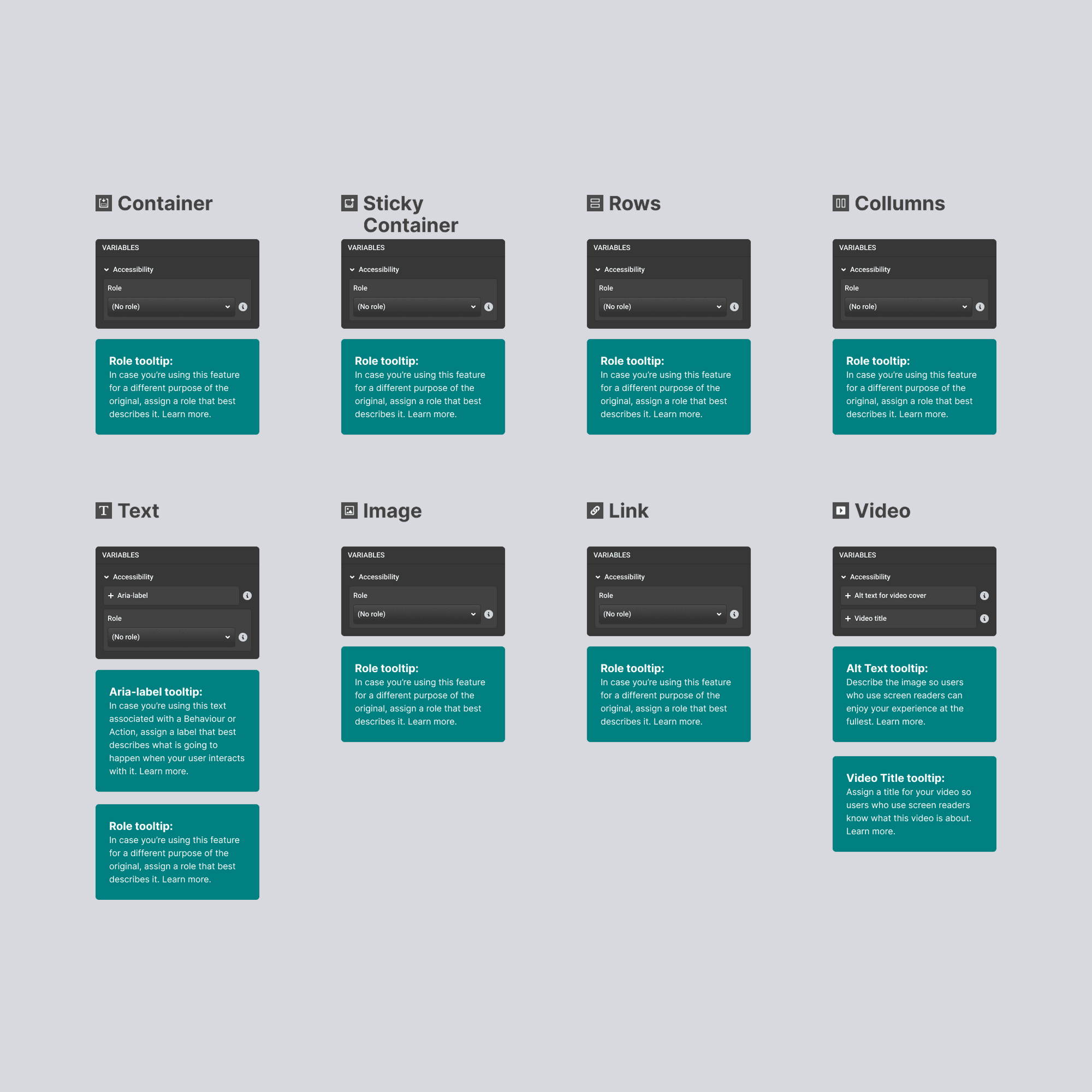
New panels to aria-labels and roles
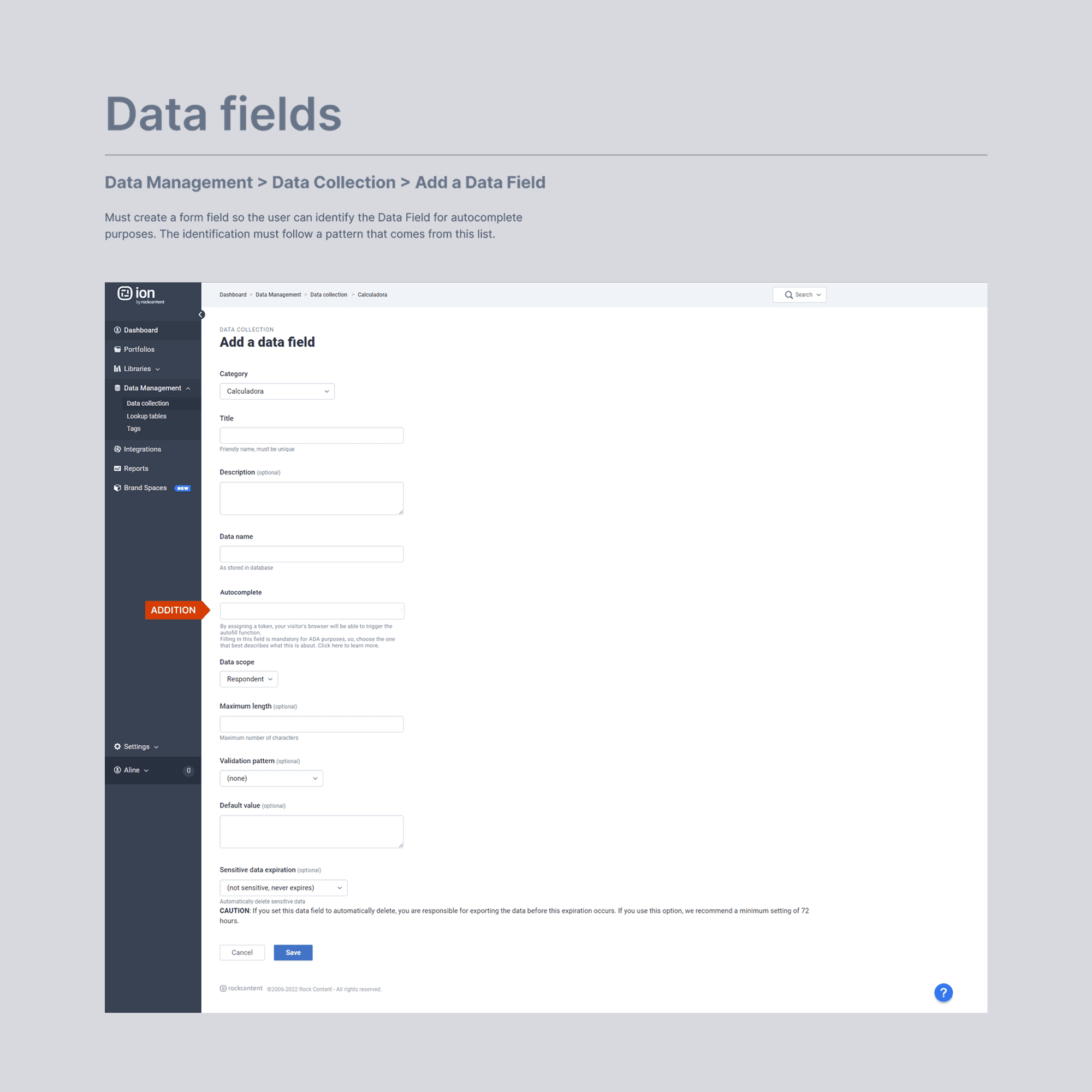
New autocomplete field
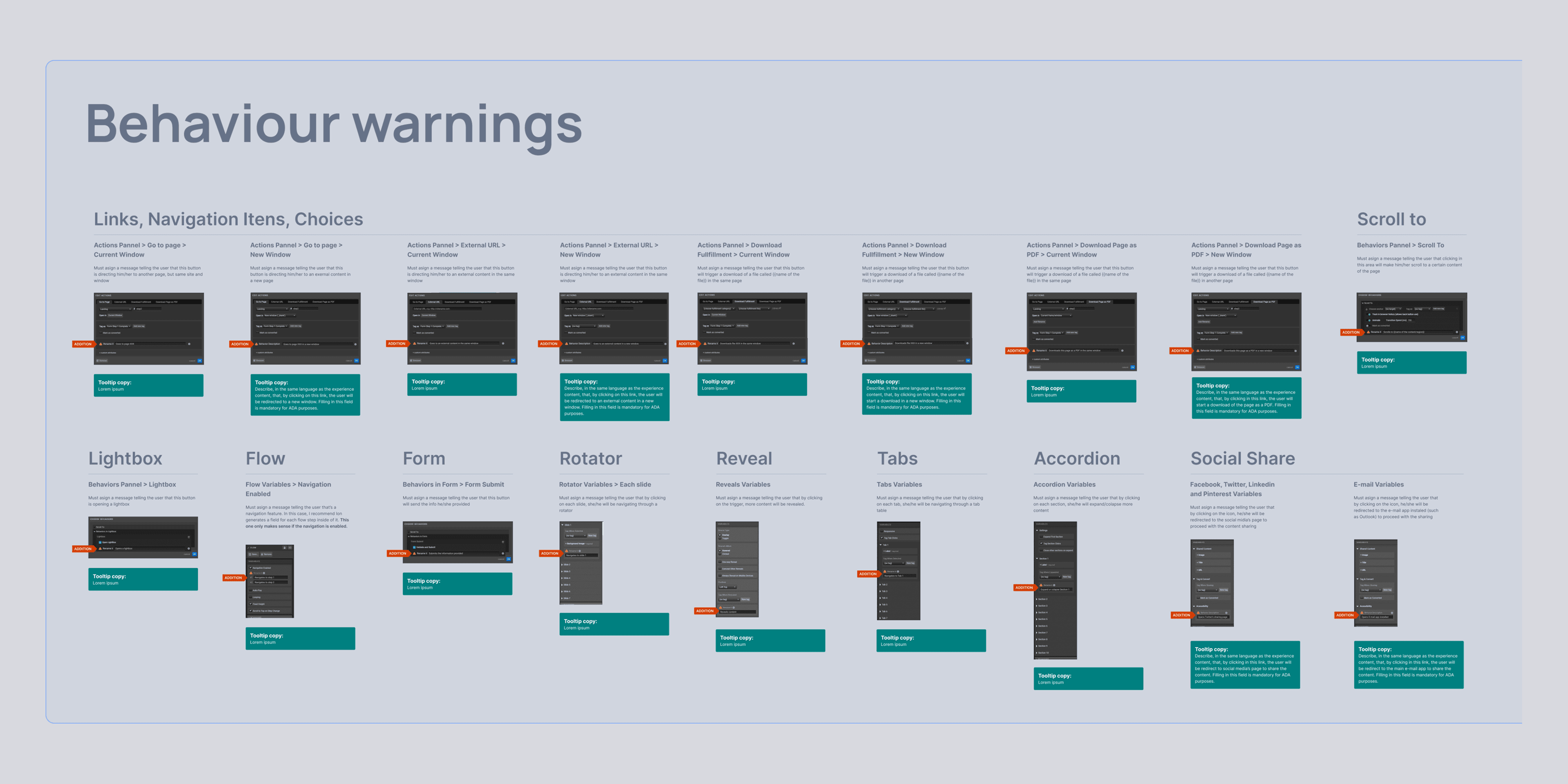
New panels to inform behaviour warnings to the user
Results
Good UX is invisible, but loud
User Empowerment & Experience:
Ion users can now confidently build interfaces that meet WCAG 2.1 AA standards with significantly less manual effort and specialized knowledge.
Compliance & Business Impact:
The project successfully addressed a key requirement from enterprise customers, particularly those operating under AODA in Ontario. It mitigated legal risks associated with non-compliance for both Ion and its users, enhancing Ion's competitive positioning as an accessibility-conscious platform.
Product Improvement:
The necessary refactoring for accessibility also led to performance improvements in certain modules.
Key Metrics:
Due to the urgency of this project, no metrics were strategically collected before or after deployment. If we had the chance to redo it, we would certainly take advantage of the opportunity to measure user adoption of these new features, as well as customer satisfaction scores.
Iterations
Expansion oportunities
Future Opportunities:
Update the platform to support WCAG 2.2 guidelines (which had its release date for the same year).
Introduce more sophisticated automated accessibility checks within the builder.
Develop richer educational resources or tutorials for users on accessibility best practices.
Learnings & next steps
Pheeew!
Summary:
This project successfully integrated critical WCAG 2.1 AA compliance features into the Ion low-code builder. It empowered users to create accessible web experiences more easily, fulfilling essential market demands and mitigating business risks, particularly relevant in the Canadian context with regulations like AODA.
Key Successes:
Successfully abstracted complex WCAG rules into an intuitive user interface within the low-code paradigm.
Delivered a solution that addressed urgent customer compliance needs despite significant technical debt.
Lessons Learned:
The critical importance of deep, early collaboration between design and engineering when tackling projects involving both legacy systems and strict external standards like WCAG.
Designing for accessibility benefits all users by enforcing clarity and structure.
Accessibility is not just a checklist; it requires ongoing effort and education.
